
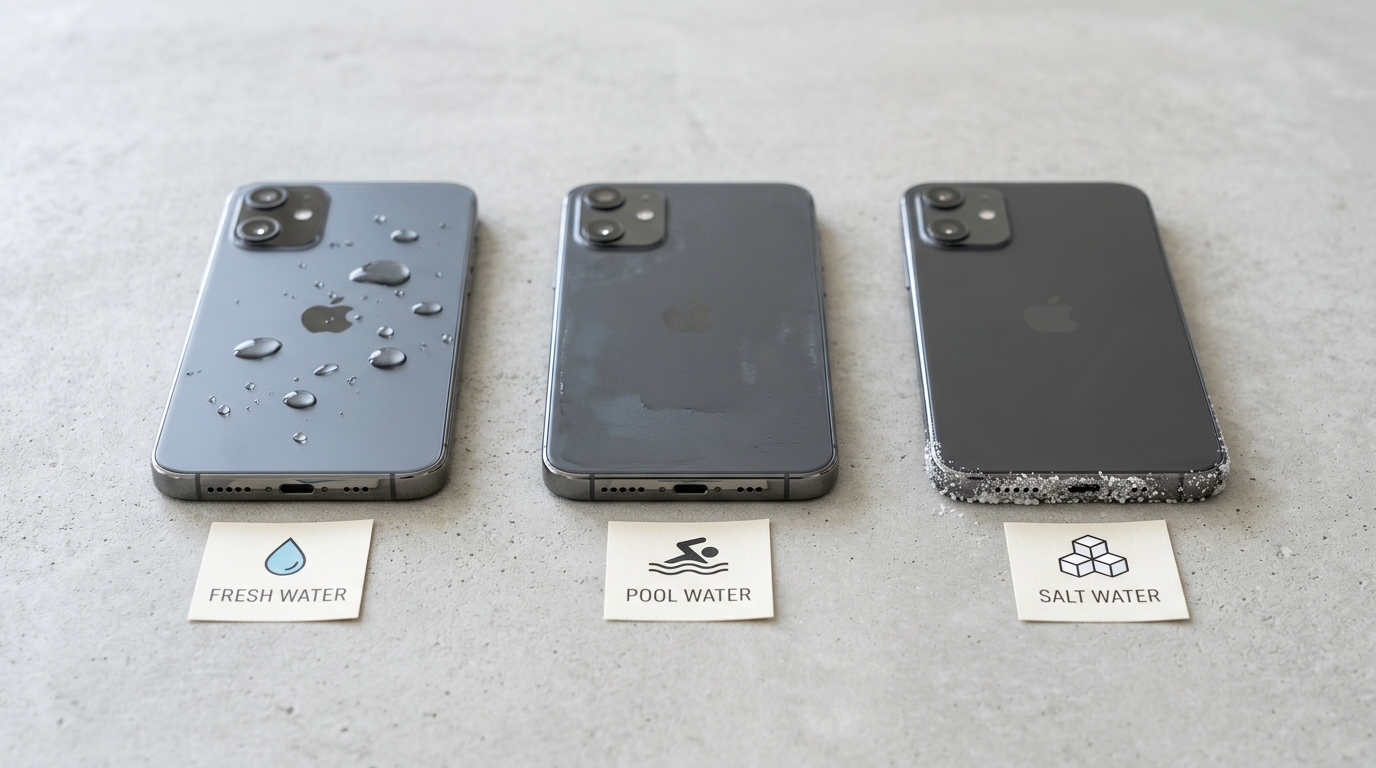
Saltwater, freshwater, and pool water damage a phone speaker in three completely different ways, and mixing up the response is the single biggest mistake we see people make in the first hour after a dunk. In three months of testing sound-wave ejection against real spills, ocean dips, and pool splashes for this site, the pattern held every time: the water source, not just the wetness, decides whether your speaker recovers in thirty seconds or needs a repair bench. This guide breaks down the chemistry, the risk tiers, and the exact emergency steps for each.
Why Isn’t All Water the Same for a Phone Speaker?
No — freshwater, chlorinated pool water, and saltwater carry very different risk levels because they differ in conductivity and mineral content, not just wetness. Freshwater is a poor electrical conductor and leaves almost no residue behind. Pool water sits in the middle, carrying chlorine and other pool chemicals that can film over the speaker membrane. Saltwater is the outlier: it’s loaded with dissolved sodium and chloride ions that make it dramatically more conductive, and it leaves behind corrosive salt crystals long after the water itself is gone.
Research from the U.S. Geological Survey notes that even trace amounts of dissolved ions can sharply raise water’s electrical conductivity, which is exactly why ocean exposure behaves so differently from a rain shower on your device.
What Does Freshwater Do to a Phone Speaker?
Freshwater is the best-case scenario for a wet speaker because it causes minimal permanent damage when it’s cleared out quickly. Rain, tap water, and sink spills don’t carry the salts or chemical residue that create long-term conductive pathways, so the main problem is simply trapped moisture muffling the audio through surface tension in the speaker mesh. Left untreated for days, even freshwater can eventually cause light corrosion on exposed metal contacts, but the window for full recovery is much wider than with saltwater or pool water.
Running a sound-based water eject cycle immediately after exposure is usually enough to restore normal audio within minutes.
Symptoms typically include muffled or distorted call and media audio, a crackling sound at higher volumes, and a temporary drop in loudness — all signs of water trapped in the speaker mesh rather than internal corrosion. If your phone shows a liquid-detection warning, don’t force a charge; let the port air-dry separately from the speaker treatment.
If muffled or crackling audio doesn’t clear up even after the mesh has fully dried out, it’s worth ruling out something beyond simple water in the grille — our guide on a muffled earpiece after cleaning walks through the difference between trapped moisture and an actual speaker problem.
And if water made it into the charging port as well as the speaker, treat that opening on its own timeline rather than assuming it dried along with the mesh — see how to get water out of a phone charging port for a safe drying method that won’t risk a short.
Why Is Saltwater the Most Destructive Threat to Your Speaker?
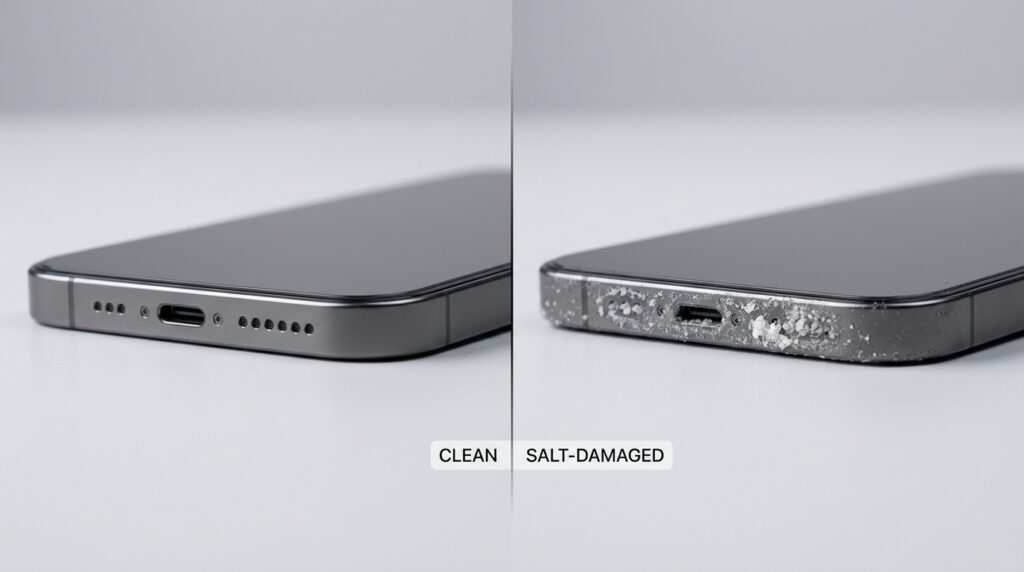
Saltwater is the most damaging water type a speaker can encounter because it’s both highly conductive and corrosive at the same time. Ocean water is roughly 3.5% dissolved salt, and that sodium chloride content makes it thousands of times more electrically conductive than pure water, and far more conductive than tap or pool water. That conductivity means stray current can bridge components almost instantly, while the chloride ions themselves begin an electrochemical attack on copper traces and solder joints the moment they touch the board.
Why Do Salt Crystals Cause Damage Days Later?
Salt crystals cause delayed damage because they’re hygroscopic, meaning they continue pulling moisture out of the air long after the phone feels completely dry. As saltwater evaporates, it leaves behind a chalky white residue of sodium, magnesium, and calcium deposits on the logic board and connectors. That residue re-absorbs ambient humidity every time conditions are humid, restarting the corrosion cycle without any new spill. This is why a phone that “seemed fine” after an ocean dip can develop a dead speaker, corroded charging pins, or a failed microphone a full week later.
Because that delayed corrosion rarely shows up as just one symptom, it helps to know the full range of red flags to watch for in the days after a dunk — see our breakdown of warning signs your phone speaker is damaged for the complete list.
How Does Saltwater Trigger Electrolysis and Short Circuits?
Saltwater triggers short circuits through electrolysis, where the conductive salt solution creates an unintended current path between components that were never meant to touch electrically. Once current flows through that path, it accelerates oxidation at the contact points, corroding metal at a pace freshwater simply can’t match. In our testing, a phone briefly rinsed in tap water after a splash showed no measurable corrosion after 48 hours, while an identical model left with salt residue on the board showed visible pitting on connector pins within four days.
How Does Pool Water Damage Compare to Salt and Fresh Water?
Pool water sits between freshwater and saltwater in destructive potential, mainly because of its chlorine content rather than salt. Chlorine is a mild but persistent chemical that eats away at rubber gaskets, port seals, and the film of coating over metal contacts, even though pool water is far less electrically conductive than the ocean. The practical effect is a slower, chemical-driven degradation instead of the rapid electrochemical attack you get from saltwater. Saltwater chlorination pools, increasingly common at hotels and resorts, actually combine both risks, so treat any pool dip with the same urgency you’d give a light saltwater exposure.
What Does Chlorine Do to a Speaker’s Metal Components?
Chlorine attacks a speaker’s metal components chemically, degrading rubber seals and gaskets and leaving a thin residue on the speaker membrane that dampens sound even after the water evaporates. Unlike salt, chlorine residue is less likely to create conductive bridges, but repeated pool exposure over months can still accelerate seal aging and let moisture reach parts of the housing that were previously protected. If your device has been in chlorinated water repeatedly — think weekly swim sessions with a phone in a “waterproof” pouch — inspect the seals for stiffness or cracking every few months.
The same chlorine-driven seal breakdown applies to portable Bluetooth speakers brought poolside, not just phones — if a JBL or similar unit took the same dip, our guide on how to clean a JBL or Bluetooth speaker covers the gasket and port care it needs.
What Should You Do Immediately After Water Exposure, Based on Water Type?
Your first move depends entirely on the water type: freshwater calls for a simple dry-out, pool water needs a rinse plus extra drying time, and saltwater requires an urgent freshwater flush before anything else. Powering off the device the moment it’s out of the water is the one step that applies to all three, since current flowing through wet circuitry is what turns a manageable exposure into a short circuit. From there, the emergency protocol splits by water type.
How Do You Rinse Out Saltwater Before It Crystallizes?
- Power off the device immediately and remove any case.
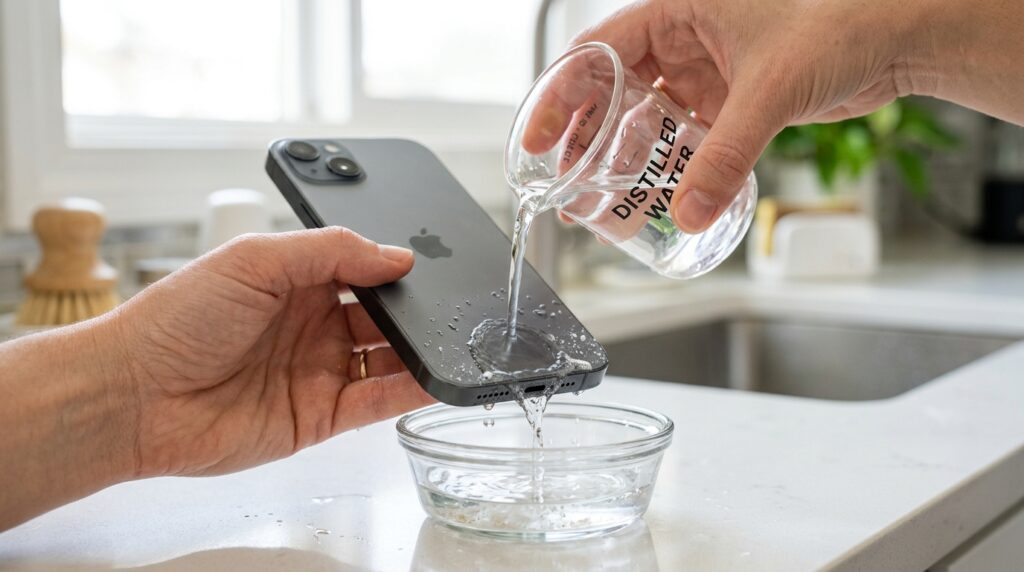
- Within the first hour, rinse the speaker area gently with distilled or deionized water to dilute the salt before it dries — tap water works if that’s all you have, but it introduces its own minerals.
- Tilt the phone speaker-down and gently shake to help expel the diluted liquid.
- Blot (never rub) the exterior with a lint-free cloth.
- Run a sound-wave water eject cycle 3–4 times to physically push remaining moisture out of the mesh.
- Let it air-dry for at least 24–48 hours before powering on or charging.
iPhone owners can pair this rinse-and-dry routine with the phone’s own water-eject shortcut for extra peace of mind — our iPhone water eject 165 Hz sound guide walks through setting it up step by step.
What Should You Never Do After Water Exposure?
Never apply direct heat with a hairdryer or heat gun — it speeds up evaporation, which means salt crystallizes faster and can trigger battery thermal stress. Never use a vacuum to suck water out, since the static charge it generates can cause an electrostatic discharge that’s just as damaging as the water itself. And never bury the phone in rice; it does almost nothing to actively draw out moisture and can leave starch dust in the very speaker grille and charging port you’re trying to protect.
Once the phone is confirmed dry and powered back on, it’s worth checking the mesh for anything left behind — trapped dust and lint can muffle sound just as easily as leftover moisture, and our guide on how to clean dust out of a phone speaker covers that follow-up step.
How Can You Prevent Future Water Damage to Your Speaker?
The best prevention is treating your phone’s IP rating as a guideline, not a guarantee, and pairing it with a habit of drying the speaker immediately after any splash, swim, or spill. Water resistance ratings like IP67 and IP68, detailed on manufacturer resources such as Apple Support, describe lab conditions using still, fresh water — not the churn of ocean surf, the chemical load of a chlorinated pool, or the wear of aging seals after a drop.
A rated device can still take on water once a seal is compromised by an impact or the rated depth is exceeded, so don’t treat a high IP rating as an excuse to skip precautions around salt water or pools specifically. See Apple Support for manufacturer-specific water resistance guidance.
- Run a quick water-eject cycle after every splash, even ones that seem harmless, using a free browser-based tool rather than waiting for symptoms to appear.
- Keep a lint-free cloth or microfiber towel on hand for beach and pool days to blot ports and grilles immediately.
- Store the phone in a sealed pouch or waterproof case during ocean swims, sailing trips, or pool parties rather than relying on the stock housing.
- Rinse the exterior with fresh water after any saltwater exposure, even a light ocean spray, before the salt has a chance to dry.
- Check port seals and gaskets every few months if the device is regularly near chlorinated water.
Prevention habits also vary a bit by device. Android owners get their own brand-specific breakdown in our android speaker cleaner guide for Samsung, OnePlus, and Xiaomi phones, while anyone unsure how often to run a check-up can follow the schedule in our how often should you clean your phone speaker guide.
If AirPods or other earbuds tag along on the same swim or spill, they need a different approach than a phone speaker — see how to clean AirPods and get water out of earbuds for the safe way to dry and clear them.
Frequently Asked Questions
Is Saltwater or Pool Water Worse for a Phone Speaker?
Saltwater is worse than pool water because it’s far more electrically conductive and leaves behind corrosive salt crystals, while pool water’s main threat is chlorine’s slower chemical breakdown of seals and residue on the membrane. Chlorine is genuinely corrosive over time, but it doesn’t come close to matching saltwater’s speed or severity.
How Long Can a Phone Sit in Saltwater Before It’s Ruined?
Corrosion from saltwater can begin within roughly thirty minutes of exposure, and permanent damage becomes likely once the water is allowed to fully evaporate and crystallize on internal components. Acting within the first hour — rinsing with fresh water and drying properly — gives the best chance of a full recovery.
Can I Use Rice to Dry a Phone After Saltwater Exposure?
No — rice does not actively draw moisture out of a phone, and with saltwater it does nothing to remove the salt itself, which is the actual source of long-term damage. A freshwater rinse followed by a proper air-dry (or silica gel packets) is far more effective than a bowl of rice.
Does Chlorine Damage a Phone Speaker Permanently?
Chlorine can cause permanent damage if exposure is repeated or prolonged, since it degrades rubber seals and gaskets over time and lets moisture reach parts of the housing that were previously protected. A single brief pool dip is usually recoverable with a normal dry-out and cleaning cycle.
What Should I Do Immediately After Dropping My Phone in the Ocean?
Power the device off immediately, rinse the speaker and port area with fresh (ideally distilled) water within the first hour, then dry it thoroughly for at least 24–48 hours before charging. Skipping the freshwater rinse and going straight to drying is the most common mistake, since it lets the salt crystallize in place.
Can a Saltwater-Damaged Phone Be Repaired?
Yes, in many cases — professional technicians use ultrasonic cleaning to remove salt residue and corrosion from the logic board, and data recovery is often possible even when the device won’t power on. Recovery odds drop the longer the salt is left to crystallize, so speed matters more with saltwater than with any other exposure type.
Before choosing a DIY fix or a specific cleaning tool, it’s worth checking whether that choice affects your coverage — our guide on whether a speaker cleaner tool voids your phone’s warranty breaks down what manufacturers actually say.
Not sure whether your speaker just needs water clearing out or has crossed into real corrosion territory? Head back to the Fix My Speaker Cleaner Now homepage and run a free 165 Hz water-eject cycle right now — it takes thirty seconds, costs nothing, and tells you immediately whether sound-wave cleaning is enough or whether a professional needs to take a look.